In 2025, digital transformation is no longer a luxury — it’s a competitive necessity. As businesses race to automate workflows, improve productivity, and innovate faster, one question continues to dominate boardroom discussions: No-Code vs Low-Code — which approach fits your business best?
Both No-Code and Low-Code platforms promise to simplify application development and empower teams to build powerful digital solutions without the need for deep technical expertise. However, choosing between them requires a clear understanding of your organization’s goals, team skills, and scalability needs.
This guide breaks down everything you need to know about No-Code vs Low-Code automation — from what they are and how they differ to how each can drive efficiency, innovation, and ROI for your business in 2025.
Understanding the Core Concepts
What Is No-Code Development?
No-Code development platforms allow users to build applications, websites, and automations without writing a single line of code. These tools use visual interfaces — drag-and-drop components, pre-built templates, and logic blocks — to let non-developers create digital products effortlessly.
Examples:
- Webflow for websites
- Zapier and Make (formerly Integromat) for automation
- Glide and Softr for apps
No-Code platforms are ideal for business users, marketers, and entrepreneurs who need to move fast without waiting for IT resources.
Key Advantages of No-Code:
- Rapid prototyping and deployment
- Reduced development costs
- Empowerment of non-technical teams
- Minimal dependency on IT
What Is Low-Code Development?
Low-Code platforms combine visual development tools with the flexibility of traditional coding. They’re built for professional developers and technical users who want to accelerate development while maintaining full control over the system logic and integrations.
Examples:
- Mendix
- OutSystems
- Microsoft Power Apps
- Retool
Low-Code tools are excellent for building enterprise-grade solutions that require customization, security, and scalability.
Key Advantages of Low-Code:
- Faster development cycles
- More flexibility than No-Code
- Easier integration with legacy systems
- Scalable for enterprise use
No-Code vs Low-Code: Key Differences
To make the right choice, you must understand how No-Code vs Low-Code differ across several dimensions.
| Criteria | No-Code | Low-Code |
|---|---|---|
| Target Users | Non-technical users | Developers & IT teams |
| Coding Required | None | Minimal |
| Customization Level | Limited | High |
| Use Cases | Simple apps, automations | Complex enterprise apps |
| Integration Capability | Basic | Advanced |
| Speed of Development | Fastest | Fast but depends on customization |
| Maintenance | Easy | Requires IT oversight |
In short, No-Code offers speed and simplicity, while Low-Code delivers control and scalability.
The Rise of No-Code and Low-Code in 2025
The global No-Code and Low-Code market is booming. According to Gartner, by 2025, over 70% of new business applications will be built using these platforms. This rapid adoption is driven by the growing demand for digital agility — the ability to quickly respond to changing market conditions through fast innovation.
Why Businesses Are Adopting These Platforms
- IT Talent Shortages — With developers in high demand, non-technical employees can now take ownership of internal processes using No-Code tools.
- Time-to-Market Pressure — Companies can launch new digital solutions in weeks instead of months.
- Cost Efficiency — Reducing the reliance on large development teams lowers overall software costs.
- Customization Needs — Low-Code enables companies to customize internal tools and customer-facing apps without starting from scratch.
When to Choose No-Code
No-Code tools shine when speed, simplicity, and independence are your top priorities. They’re perfect for:
1. Startups and Small Businesses
If you’re a small business or a startup with limited development resources, No-Code lets you build MVPs, landing pages, and automation workflows quickly and affordably.
2. Marketing and Operations Teams
Need to automate lead nurturing, customer onboarding, or reporting? Tools like Zapier, Airtable, and Notion make it easy to connect systems and streamline operations — all without writing code.
3. Internal Tools and Prototyping
For teams that want to test new ideas or build dashboards fast, No-Code platforms provide ready-to-use building blocks that can go live in hours.
Example:
A marketing team uses Airtable Automations and Zapier to manage campaign workflows — eliminating repetitive manual tasks and improving collaboration.
Ideal Use Case:
- Simple app or automation
- Minimal technical complexity
- Limited IT involvement
When to Choose Low-Code
Low-Code platforms are the best choice when complex logic, scalability, or system integration is essential.
1. Enterprise Application Development
Enterprises with existing systems (like ERP or CRM) often need custom integrations. Low-Code tools allow developers to visually design most parts of the app while still adding custom code where needed.
2. Complex Business Logic
If your process involves multiple data sources, APIs, or conditional logic, Low-Code ensures you maintain flexibility without sacrificing speed.
3. IT and Development Teams
Low-Code platforms empower developers to accelerate repetitive parts of development (like UI design or backend workflows) and focus on high-value logic or integrations.
Example:
A logistics company uses OutSystems to build a supply chain dashboard that integrates data from various APIs — achieving real-time visibility and faster decision-making.
Ideal Use Case:
- Custom enterprise systems
- Complex workflows
- Long-term scalability
No-Code vs Low-Code: The Hybrid Approach
In 2025, the line between No-Code and Low-Code is blurring. Many organizations are adopting a hybrid approach, combining both technologies for maximum agility.
How This Works
- Business Teams use No-Code tools to create prototypes, dashboards, and workflows.
- IT Teams use Low-Code platforms to refine, scale, and integrate those prototypes into enterprise systems.
Example of Hybrid Success
A retail brand might use No-Code automation (via Zapier or Make) to manage marketing data, while developers build a Low-Code analytics layer in Microsoft Power Platform for deeper insights.
The result: faster innovation cycles and smoother collaboration between departments.
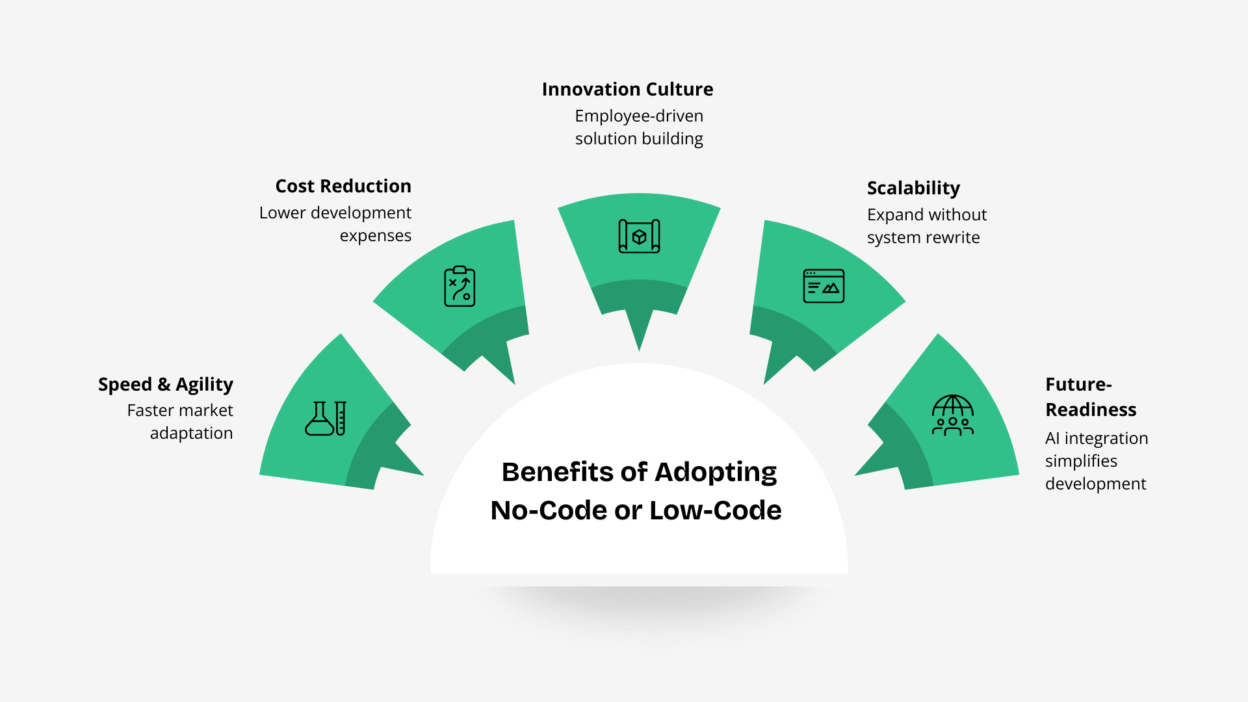
Benefits of Adopting No-Code or Low-Code in 2025
Whether you choose No-Code or Low-Code, your business stands to gain from key benefits that align with 2025’s digital priorities:
- Speed & Agility – Rapid deployment means faster adaptation to market shifts.
- Cost Reduction – Save on hiring large dev teams and infrastructure.
- Innovation Culture – Empower employees to build solutions themselves.
- Scalability – Especially with Low-Code, businesses can expand without rewriting systems.
- Future-Readiness – As AI and automation converge, both No-Code and Low-Code tools are integrating with AI agents to further simplify development.
Challenges to Consider
Despite the advantages, businesses must also weigh some challenges before deciding on No-Code vs Low-Code:
- Vendor Lock-In: Some platforms limit data portability.
- Security Risks: No-Code tools may not meet enterprise security standards.
- Limited Customization: No-Code apps can struggle with unique business needs.
- Skill Gaps: Low-Code still requires technical understanding for maintenance.
How to Decide: No-Code vs Low-Code
Use this quick checklist to determine which path fits your business in 2025:
| Question | If Yes → Choose |
|---|---|
| Do you lack in-house developers? | No-Code |
| Do you need to integrate multiple systems? | Low-Code |
| Do you need rapid prototyping? | No-Code |
| Is long-term scalability critical? | Low-Code |
| Are your apps internal-only and simple? | No-Code |
| Do you require deep customization or compliance? | Low-Code |
Pro Tip: Start small with No-Code for quick wins, then evolve into Low-Code as your digital maturity grows.
The Future of Automation: Beyond No-Code vs Low-Code
As AI-driven development tools emerge, No-Code and Low-Code platforms are becoming even more intelligent. In 2025, many platforms integrate AI copilots that can generate workflows, suggest logic, or even write backend scripts automatically.
This means the future isn’t about choosing one over the other — it’s about leveraging both strategically. The best businesses are already blending No-Code agility with Low-Code power to build smarter, faster, and more connected ecosystems.
Conclusion: Finding the Right Fit
When it comes to No-Code vs Low-Code, the right choice depends on your goals, resources, and growth strategy.
- Choose No-Code if your priority is speed, simplicity, and empowering non-technical teams.
- Choose Low-Code if you need flexibility, control, and long-term scalability.
- Combine both for a future-ready, agile, and collaborative digital environment.
In 2025, success belongs to businesses that balance creativity with structure — empowering teams to build faster, automate smarter, and innovate without limits. Whether you choose No-Code or Low-Code, the goal is the same: turn ideas into impact, faster than ever before.